Add Bulk Resident Charges (Charges to Multiple Residents)
Bulk Charges
Bulk charges allows you to easily bill all, or multiple residents a one time or recurring monthly charge. This feature is commonly used for one time, or variable charges such as utilities or special assessments.
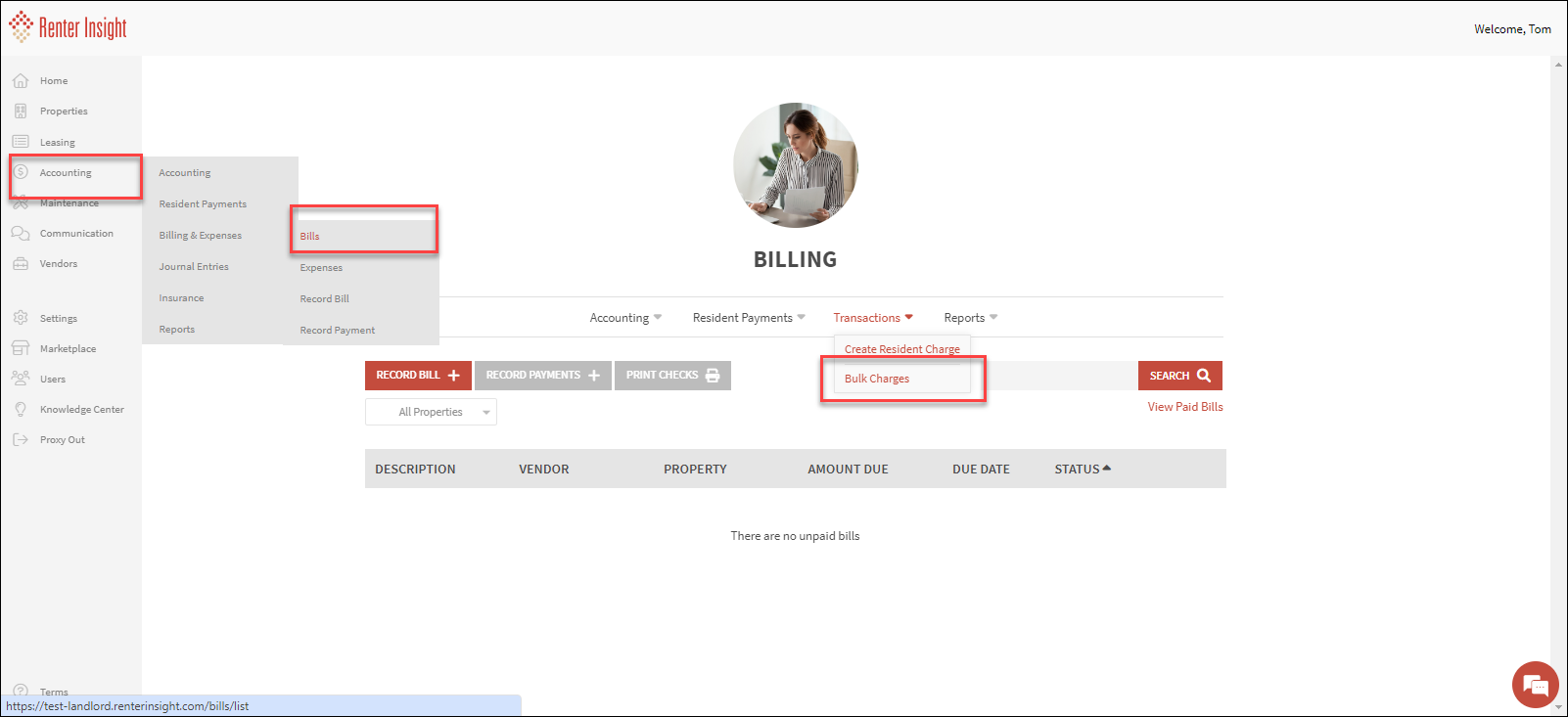
- On the left sidebar, select Accounting>Bills
Click Bulk Charges
Click Add Bulk Charge
Complete Information that will appear on New Charge and Resident Ledger
Select either All Properties, or Select specific Leases/Residents
Select All Leases/Residents, or Specific leases
- If selecting individual leases, select the leases and click Add Leases
- You can now edit the Amount (if you chose not same amount for all leases), and description
- Click Save Lease Selections
- Your Charges are now scheduled
- Note: Lease charges will end at the end of a lease, or the selected end date, whichever is earlier
Edit Bulk Charges
- To Edit scheduled charges, click on the three dot menu and click edit
- Edit Charge Details, or select Continue to Edit Recipients
- Edit Recipients or click Save Lease Selections to save your changes